Friday, June 6, 2014

Disassembling Magicshine MJ-876/878 dive light

Here is how to disassemble the Magicshine MJ-876/878 dive light. This is just a copy of this post trying to make it more readable.

All credit goes to EskildJ

To remove the battery


Get a 15mm nut. Drill a bit into the threading using a 10mm drill. This Tool will open the battery compartment:


So you can see the nice 6*18650 pack, and if you hoped that the charging connector was Water-tight, it isn't.
To get to the switching ring, you don't need to dismount the battery.


To remove the front


You can't simply unscrew the lamp at the battery indicator. You need to remove the reflector first.

Remove the glass holder ring:


You need to make a Tool to unscrew this. I did like this, and it worked fine:


After removing the glass, you see the glass o-ring. You are now at the reflector. unscrew it to get it out.


You can now un-screw the front part of the lamp, threading is in front of the battery indicator.


Notice the two green O-rings. Remove the two green O-rings, and you can slide forward the battery indicator ring:


Then remove the switch ring, beware of the spring/ball:


Notice that the LED window is only single or-ring secured - I guess it is OK, as the Water will compress the plastic opposed to the alu. But it needs to be clean!

Now, the magnet is visible. It is a round disc, 5mm diameter and around 1mm thick.


It is very visible why it is weak. It is corroded away. This could also explain why some people complain about sand under the ring. The "sand" could be disintegrated magnet.

Disassembling the Electronics

I didn't disassemble the Electronics this time, to avoid messing with the heat sink paste under the LED. But it is straight-forward, unscrewing the two-hole ring around the LED.

Wednesday, October 17, 2012

Trello Bugzilla Integration

Here is a GreaseMonkey script that provides simplistic integration of Bugzilla into Trello.com.


So far it supports:
  • Decorating cards that have 'Bug \d+' in their card title with a badge that is a hyper link to Bugzilla.

  • Auto-completion of new card titles starting with 'Bug \d+' 

The script also works in Chrome with the Tampermonkey extension installed.

You can get the code on GitHub


// ==UserScript==
// @name Trello Bugzilla Integration
// @namespace http://www.navicon.dk/
// @version 0.1
// @require http://ajax.googleapis.com/ajax/libs/jquery/1.3.2/jquery.min.js
// @description Looks for card titles with 'Bug \d+' and adds badge/links to bugzilla. Also autocompletes new card titles that starts with 'Bug \d+' from bugzilla. Autocomplete is actived when pressing spacebar after 'Bug \d+'.
// @match https://trello.com/board/*
// @copyright 2012+, Carsten Madsen
// ==/UserScript==

// grey bugz icon
var bugzillaImg = '';

// edit me to point somewhere else
var bugzillaLink = 'http://bugzilla.mozilla.com/show_bug.cgi?id=';

var addBugzillaBadge = function() {
    $(".list-card-title").each(function(i,val){
    if ($(this).html().match(/Bug \d+/)) {
        var regExpMatch = $(this).html().match(/Bug (\d+)/);
        if ($(this).parent().find(".bugz").length < 1){
        $(this).parent().children('.badges').append(''+bugzillaImg+'');}
    }
    });
};

// intercept spacebar press when creating new cards and look in
// bugzilla to do possible autocomplete

unsafeWindow.$("body").delegate(".js-card-title", "keypress", function(e){
    var code = (e.keyCode ? e.keyCode : e.which);
    if(code == 32) { //Space keycode
    var text = $(this).val();
    var regExpMatch = text.match(/Bug (\d+)/);
    var textarea = $(this);
    if (regExpMatch) {
        // see http://stackoverflow.com/questions/11007605/gm-xmlhttprequest-why-is-it-never-firing-the-onload-in-firefox
        setTimeout(function() {GM_xmlhttpRequest({
        method: "GET",
        url: bugzillaLink+regExpMatch[1],
        onload: function(response) {
            var jq = $(response.responseText);
            textarea.val(jq.find(".bz_alias_short_desc_container b").text().replace(String.fromCharCode(160)," ")+ " - " + jq.find("#short_desc_nonedit_display").text());
        }
        })}, 0);
    }   
    }
});

setInterval(addBugzillaBadge, 5000);

Wednesday, August 3, 2011

CouchBoard - Porting a ROR/JQuery application to CouchDB/JQuery


Looking for a replacement for our small company Scrummy taskboard I stumbled over CognifidesLabs Taskboard Ruby On Rails (ROR) application. It looked useful but it seemed stale and being a complete ROR imbecile and a JavaScript novice I initially gave up as the entry threshold just seemed to big.


But after fooling around with CouchDB in another context I realized that maybe I could scrap the entire ROR backend as the data exchange format was JSON and just port the http requests to the ROR backend to CouchDB JavaScript.

At first this seemed as a daunting task as most tutorials etc. for doing CouchDB application development uses couchapp so even a simple task as figuring out how to port the login logic was hard. Eventually I found couchdb-login-jquery and from there on the porting job was as easy a calling the CouchDB JavaScript CRUD functions.

The ROR back end is approximately 1700 lines of Ruby code this was exchanged for an additional 200 lines of JavaScript. For somebody used to setting up Eclipse, Maven, Tomcat, Spring, Spring Security, PostgreSQL just to get started it seems unreal to just use a text editor, reupholster and Firefox/Firebug for the entire developmet process.

On top of this all that is needed to host the application is a free account at cloudant where you get a scalable, fault-tolerant, distributed database to host your applications in.

In summary porting the ROR backend to pure CouchDB/JavaScript was surprisingly easy. The most diffuclt part was acctual to understand the CouchDB security model and then learn that the cloudant (BigCouch) model was incompatible.

In case you need a small and simple to manage scrum/kanban board you can get the code from here and you can test the application here

Friday, October 15, 2010

Preliminary GRIB rendering for OpenMap

I have managed to render GRIB weather data in a OpenMap layer. It should support GRIB data from a numbers of free sources like NOAA.

Looks pretty cool with the isobars, wind arrows and a wind heat map.

The images below are showing a storm front (Xynthia) hitting Western Europe.


Comments are welcome!

Wednesday, August 18, 2010

Geonames location searcher for OpenMap

Here is an integration of openmap with geonames that will add a combobox that can be used to search geonames.org to the toolbar by adding the following to your openmap.properties file:

openmap.components=... geonamessearcher
geonamessearcher.class=GeoNamesSearcher

Here is the code

import java.awt.event.ActionEvent;
import java.awt.event.ActionListener;

import javax.swing.DefaultComboBoxModel;
import javax.swing.DefaultListCellRenderer;
import javax.swing.JComboBox;
import javax.swing.JComponent;
import javax.swing.JList;
import javax.swing.plaf.basic.BasicComboBoxEditor;

import net.miginfocom.swing.MigLayout;

import org.apache.log4j.Logger;
import org.geonames.Toponym;
import org.geonames.ToponymSearchCriteria;
import org.geonames.ToponymSearchResult;
import org.geonames.WebService;

import com.bbn.openmap.event.CenterListener;
import com.bbn.openmap.event.CenterSupport;
import com.bbn.openmap.gui.OMToolComponent;

public class GeoNamesSearcher extends OMToolComponent {

private static final Logger log = Logger.getLogger(GeoNamesSearcher.class
.getName());

private JComboBox searchBox;

private CenterSupport centerDelegate;

private DefaultComboBoxModel searchBoxModel = new DefaultComboBoxModel();

public GeoNamesSearcher() {
centerDelegate = new CenterSupport(this);
setLayout(new MigLayout());
searchBox = new JComboBox(searchBoxModel);
searchBox.setEditable(true);
searchBox.setMaximumRowCount(25);
searchBox
.setToolTipText("Enter part of location to search for (and center to).");
searchBox.setRenderer(new DefaultListCellRenderer() {
@Override
public JComponent getListCellRendererComponent(JList list,
Object value, int index, boolean isSelected,
boolean cellHasFocus) {
super.getListCellRendererComponent(list, value, index,
isSelected, cellHasFocus);
if (value instanceof Toponym) {
Toponym toponym = (Toponym) value;
setText(toponym.getName() + " " + toponym.getCountryCode());
}
return this;
}
});
searchBox.setEditor(new BasicComboBoxEditor() {
@Override
public void setItem(Object anObject) {
if (anObject != null) {
if (anObject instanceof Toponym) {
Toponym toponym = (Toponym) anObject;
editor.setText(toponym.getName() + " "
+ toponym.getCountryCode());
// oldValue = anObject;
} else {
super.setItem(anObject);
}
} else {
editor.setText("");
}
}
});


searchBox.addActionListener(new ActionListener() {
@Override
public void actionPerformed(ActionEvent evt) {
JComboBox cb = (JComboBox) evt.getSource();

Object selectedItem = cb.getSelectedItem();

if ("comboBoxEdited".equals(evt.getActionCommand())) {
// User has typed in a string; only possible with an
// editable combobox
try {
searchBoxModel.removeAllElements();
ToponymSearchCriteria searchCriteria = new ToponymSearchCriteria();
// searchCriteria.setCountryCode("DK");
searchCriteria.setQ((String) selectedItem);
ToponymSearchResult searchResult = WebService
.search(searchCriteria);
for (Toponym toponym : searchResult.getToponyms()) {
searchBoxModel.addElement(toponym);
}
if (searchResult.getTotalResultsCount() == 1) {
Toponym t = searchResult.getToponyms().get(0);
centerDelegate.fireCenter(t.getLatitude(), t
.getLongitude());
} else if (searchResult.getTotalResultsCount() > 1) {
searchBox.showPopup();
}
} catch (Exception e) {
log.error("", e);
}

} else if ("comboBoxChanged".equals(evt.getActionCommand())) {
// User has selected an item; it may be the same item
if (cb.getSelectedItem() instanceof Toponym) {
Toponym newItem = (Toponym) cb.getSelectedItem();
centerDelegate.fireCenter(newItem.getLatitude(),
newItem.getLongitude());
}
}

}
});
add(searchBox);
}

public synchronized void addCenterListener(CenterListener listener) {
centerDelegate.add(listener);
}

/**
* Remove a CenterListener
*
* @param listener
* CenterListener
*/
public synchronized void removeCenterListener(CenterListener listener) {
centerDelegate.remove(listener);
}

@Override
public void findAndInit(Object obj) {
if (obj instanceof CenterListener) {
addCenterListener((CenterListener) obj);
}
}

@Override
public void findAndUndo(Object obj) {
if (obj instanceof CenterListener) {
removeCenterListener((CenterListener) obj);
}
}
}

Wednesday, September 23, 2009

Using JavaFX Classes Directly From Java

Sitting on the Swing side of the fence the grass on the JavaFX side certainly sometimes seems a lot greener.


Knowing that the latest and greatest scene graph code is available somewhere in the pile of JavaFX jars it is tempting to try and get access to it from the Swing side without being "bothered" with the JavaFX language.

Other people like Matt Hicks have had the same thoughts (see I Hate JavaFX; I Love JavaFX!) so I started out with trying Matt's port of the JavaFX Clock and after some fiddling I got it up and running with JavaFX 1.2. Try it by pushing the launch button below.


The code follows (add all the JavaFX SDK jars to your classpath before trying this):

/**
* @author Matt Hicks (matt@matthicks.com)
*/
public class Clock {
private float radius = 77;
private float centerX = 144;
private float centerY = 144;
private Calendar calendar = Calendar.getInstance();
private int hours;
private int minutes;
private int seconds;

private FloatVariable hoursVariable;
private FloatVariable minutesVariable;
private FloatVariable secondsVariable;

public Clock() throws IOException {
nextTick();

// Build JavaFX clock
Group group = new Group();
{
ImageView imageView = new ImageView();
Image image = new Image();
// should be image.set$url() but does not work ?
image.loc$platformImage().set(
ImageIO.read(getClass().getClassLoader().getResource(
"clock_background.png")));
imageView.set$image(image);
group.loc$content().insert(imageView);

Group face = new Group();
{
Translate translate = new Translate();
translate.set$x(centerX);
translate.set$y(centerY);
face.loc$transforms.insert(translate);

// Every third hour
for (int i = 3; i <= 12; i += 3) {
Text text = new Text();
translate = new Translate();
translate.set$x(-5.0f);
translate.set$y(5.0f);
text.loc$transforms.insert(translate);
text.set$font(Font.font("Arial", 16));
text.set$x(radius * ((i + 0) % 2 * (2 - i / 3)));
text.set$y(radius * ((i + 1) % 2 * (3 - i / 3)));
text.set$content(String.valueOf(i));
face.loc$content.insert(text);
}

// Black circle for the rest of the hours
for (int i = 1; i < 12; i++) {
if (i % 3 == 0) {
continue; // Don't show a circle on every third hour
}

Circle circle = new Circle();
Rotate rotate = new Rotate();
rotate.set$angle(30.0f * i);
circle.loc$transforms.insert(rotate);
circle.set$centerX(radius);
circle.set$radius(3.0f);
circle.set$fill(Color.$BLACK);
face.loc$content.insert(circle);
}

// Center circles
Circle circle = new Circle();
circle.set$radius(5.0f);
circle.set$fill(Color.$DARKRED);

face.loc$content.insert(circle);
circle = new Circle();
circle.set$radius(3.0f);
circle.set$fill(Color.$RED);
face.loc$content.insert(circle);

// Second hand
Line line = new Line();
{
Rotate rotate = new Rotate();
BindingExpression exp = new AbstractBindingExpression() {
@Override
public void compute() {
pushValue(seconds * 6f);
}
};
secondsVariable = FloatVariable.make(exp);
rotate.loc$angle().bind(false, secondsVariable);

line.loc$transforms.insert(rotate);

line.set$endY(-radius - 3.0f);
line.set$strokeWidth(2.0f);
line.set$stroke(Color.$RED);
}
face.loc$content.insert(line);

// Hour hand
Path path = new Path();
{
Rotate rotate = new Rotate();
BindingExpression exp = new AbstractBindingExpression() {
@Override
public void compute() {
pushValue((float) (hours + minutes / 60) * 30 - 90);
}
};

hoursVariable = FloatVariable.make(exp);
rotate.loc$angle().bind(false, hoursVariable);
path.loc$transforms.insert(rotate);

path.set$fill(Color.$BLACK);

MoveTo e1 = new MoveTo();
e1.set$x(4.0f);
e1.set$y(4.0f);
path.loc$elements.insert(e1);
ArcTo e2 = new ArcTo();
e2.set$x(4.0f);
e2.set$y(-4.0f);
e2.set$radiusX(1.0f);
e2.set$radiusY(1.0f);
path.loc$elements.insert(e2);
LineTo e3 = new LineTo();
e3.set$x(radius - 15.0f);
e3.set$y(0.0f);
path.loc$elements.insert(e3);
}
face.loc$content.insert(path);

// Minute hand
path = new Path();
{
Rotate rotate = new Rotate();
BindingExpression exp = new AbstractBindingExpression() {
public void compute() {
pushValue((float) minutes * 6 - 90);
}
};
minutesVariable = FloatVariable.make(exp);
rotate.loc$angle().bind(false, minutesVariable);

path.loc$transforms.insert(rotate);
path.set$fill(Color.$BLACK);

MoveTo e1 = new MoveTo();
e1.set$x(4.0f);
e1.set$y(4.0f);
path.loc$elements.insert(e1);
ArcTo e2 = new ArcTo();
e2.set$x(4.0f);
e2.set$y(-4.0f);
e2.set$radiusX(1.0f);
e2.set$radiusY(1.0f);
path.loc$elements.insert(e2);
LineTo e3 = new LineTo();
e3.set$x(radius);
e3.set$y(0.0f);
path.loc$elements.insert(e3);
}
face.loc$content.insert(path);

group.loc$content.insert(face);
}
}

Timeline timeline = new Timeline();
timeline.set$repeatCount(Timeline.$INDEFINITE);

KeyFrame kf = new KeyFrame();
kf.set$time(Duration.valueOf(1000.0f));
kf.set$canSkip(true);
kf.set$action(new Function0<Void>() {
public Void invoke() {
nextTick();
return null;
}
});
timeline.loc$keyFrames.insert(kf);
// this is somewhat hairy JFxtras does it like this I think
Scene scene = new Scene();
scene.loc$content().insert(group);
JPanel panel = new JPanel(new BorderLayout());
TKScene fxNode = scene.get$javafx$scene$Scene$impl_peer();
panel.add(((SwingScene) fxNode).scenePanel, BorderLayout.CENTER);
JFrame frame = new JFrame("JavaFX Clock Example");
frame.setDefaultCloseOperation(JFrame.EXIT_ON_CLOSE);
frame.add(panel);
frame.setSize(295, 325);
frame.setVisible(true);
timeline.play();
}

public void nextTick() {
calendar.setTimeInMillis(System.currentTimeMillis());
seconds = calendar.get(Calendar.SECOND);
minutes = calendar.get(Calendar.MINUTE);
hours = calendar.get(Calendar.HOUR_OF_DAY);
// trigger bindings to re calc and move hands
if (secondsVariable != null) {
secondsVariable.invalidate();
minutesVariable.invalidate();
hoursVariable.invalidate();
}
}

public static void main(String[] args) throws Exception {
SwingUtilities.invokeLater(new Runnable() {
@Override
public void run() {
try {
new Clock();
} catch (Exception e) {
e.printStackTrace();
}
}
});
}
}

For comparison the JavaFX version follows here:

public class Clock extends CustomNode {

public var radius: Number = 77;
public var centerX: Number = 144;
public var centerY: Number = 144;

public var hours:Number;
public var minutes:Number;
public var seconds:Number;

public function nextTick () {
var now = new Date();
seconds = now.getSeconds();
minutes = now.getMinutes();
hours = now.getHours();
}

public override function create() : Node {
return Group {
content: [
ImageView {
image: Image {
url: "{__DIR__}clock_background.png"
}
},
Group {
transforms: Translate {
x: centerX,
y: centerY
}
content: [
// code to display the numbers for every third hour
for (i in [3, 6, 9, 12])
Text {
transforms: Translate {
x: -5,
y: 5
}
font: Font {
size: 16
}
x: radius * (( i + 0 ) mod 2 * ( 2 - i / 3))
y: radius * (( i + 1 ) mod 2 * ( 3 - i / 3))
content: "{i}"
}, //Text


//code to display a black circle for the rest of the hours on the clock
for (i in [1..12])
if (i mod 3 != 0 ) then Circle {
transforms: Rotate {
angle: 30 * i
}
centerX: radius
radius: 3
fill: Color.BLACK
} //for
else [ ],

// code for the clock's first center circle
Circle {
radius: 5
fill: Color.DARKRED
}, //Circle
//code for the smaller center circle
Circle {
radius: 3
fill: Color.RED
}, //Circle
//code for the seconds hand
Line {
transforms: Rotate {
angle: bind seconds * 6
}
endY: -radius - 3
strokeWidth: 2
stroke: Color.RED
}, //Line
//code for the hour hand
Path {
transforms: Rotate {
angle: bind (hours + minutes / 60) * 30 - 90
}
fill: Color.BLACK
elements: [
MoveTo {
x: 4,
y: 4},
ArcTo {
x: 4
y: -4
radiusX: 1
radiusY: 1},
LineTo{
x: radius - 15
y: 0},
] //elements
}, // Path
// code for the minutes hand
Path {
transforms: Rotate {
angle: bind minutes * 6 - 90
}
fill: Color.BLACK
elements: [
MoveTo {
x: 4,
y: 4},
ArcTo {
x: 4
y: -4
radiusX: 1
radiusY: 1},
LineTo{
x: radius
y: 0},
] // elements
} // Path
] //content
}
]
};
}

init {
var timeline = Timeline {
repeatCount: Timeline.INDEFINITE
keyFrames: [
KeyFrame {
time: 1s
canSkip: true
action: function() {
nextTick();
}
}
]
}
timeline.play();
}
}

Web start depolyment is rather easy as it is possible to take advantage of the JavaFX extension and just add:


to your jnlp file and then do the usual jnlp stuff.

Saturday, September 12, 2009

Country Flag Decorations On Your Swing Components

Here is how to get country flag icon decorations on your JTable cells, JList cells, JCombobox'es and JTextFields.


First you need to grab the Flag Icons from the famfamfam site and package them into a jar file and add it to your classpath. The JTextField flag decoration is done via the BuddySupport in the xswingx project.

Then we need to set up a mapping of country names to famfamfam icon names like this:

private final String[] countries = { "AFGHANISTAN", "AF", "Ă…LAND ISLANDS",...}
Map<String, String> countryMap = new HashMap<String, String>();
for (int i = 0; i < countries.length;) {
countryMap.put(countries[i], countries[i + 1]);
i += 2;
}
countryFlagDecorator = new CountryFlagDecorator(countryMap);
// lazy do CountryFlagDecorator.getInstance() and skip the above mapping setup

Now we can decorate e.g., a JCombobox like this:

JComboBox flagCombo = new JComboBox(new String[] { "DENMARK", "SWEDEN",
"NORWAY" });
countryFlagDecorator.addCountryFlagDecorations(flagCombo);

A JTable cell like this:

JTable jt = new JTable(data, fields);
TableColumn col = jt.getColumnModel().getColumn(2);
col.setCellRenderer(new CountryFlagTableCellRendere(
countryFlagDecorator));
col.setCellEditor(new CountryFlagCellEditor(countryFlagDecorator,
new String[] { "DENMARK", "SWEDEN", "NORWAY" }));

A Jlist (with a small twist)

JList flagList = new JList(new String[] { "DK", "SE", "NO", "US" });
flagList.setCellRenderer(new CountryFlagListCellRendere(
countryFlagDecorator, new CountryNameConverter() {
@Override
public String convertCountryName(String countryName) {
if ("DK".equals(countryName)) {
return "DENMARK";
} else if ("SE".equals(countryName)) {
return "SWEDEN";
} else if ("NO".equals(countryName)) {
return "NORWAY";
} else if ("US".equals(countryName)) {
return "UNITED STATES";
}
return null;
}
}));

And a JTextField like this:

JTextField flagField = new JTextField("");
PromptSupport.setPrompt("Write name of a country, e.g., DENMARK", flagField);
countryFlagDecorator.addCountryFlag(flagField, null);

Download the source

Wednesday, September 9, 2009

Google Earth 3D Vessel Models With Swing & Jetty

Using a Swing GUI with an embedded instance of Jetty a real time stream of vessel position information (AIS data) is converted into KML.This converts Google Earth into a low cost (free) AIS Display system. Vessels can be displayed as 3D models that are scaled according to AIS information


You can give it a spin (Google Earth needs to be installed) by pushing the launch button below.


Sunday, September 6, 2009

Fancy JLabels With JHLabs Filters

Recently I was looking for a way to create "fancy" text for some title panes and I stumbled over JHLabs Image Filters.


Over at JHLabs there are examples of how to create e.g., glowing text:


Or chrome like text:


To get a simmlar effect on a JLabel just replace the JLabel with a JHLabsLabel e.g.;

JLabel label = new JHLabsLabel("Hello World", new ChromeFilter(), new ShadowFilter(5, 5, 2, .7f));


Here is the code for JHLabsLabel:

/**
* Notice that this is not perfect wrt alignment to see just uncomment super.paintComponent(g)
* Maybe somebody with BasicLabelUI knowledge could help?
*
*/
public static final class JHLabsLabel extends JLabel {

private int textX;

private int textY;

private AbstractBufferedImageOp[] filters;

public JHLabsLabel(String string, AbstractBufferedImageOp... filters) {
super(string);
this.filters = filters;
}

@Override
public void paintComponent(Graphics g) {

// super.paintComponent(g);

BufferedImage img = createTextImage(getText(), getFont());

for (AbstractBufferedImageOp f : filters) {
img = f.filter(img, null);
}

// g.drawImage(f.filter(img, null), textX, textY, null);
g.drawImage(img, textX, textY, null);
}

private BufferedImage createTextImage(String text, Font font) {

Rectangle paintIconR = new Rectangle();
Rectangle paintTextR = new Rectangle();
Rectangle paintViewR = new Rectangle();
Insets paintViewInsets = new Insets(0, 0, 0, 0);

paintViewInsets = getInsets(paintViewInsets);
paintViewR.x = paintViewInsets.left;
paintViewR.y = paintViewInsets.top;
paintViewR.width = getWidth()
- (paintViewInsets.left + paintViewInsets.right);
paintViewR.height = getHeight()
- (paintViewInsets.top + paintViewInsets.bottom);

String clippedText = SwingUtilities.layoutCompoundLabel(
(JComponent) this, getFontMetrics(getFont()), text,
getIcon(), getVerticalAlignment(),
getHorizontalAlignment(), getVerticalTextPosition(),
getHorizontalTextPosition(), paintViewR, paintIconR,
paintTextR, getIconTextGap());

boolean isAntiAliased = true;
boolean usesFractionalMetrics = false;
FontRenderContext frc = new FontRenderContext(null, isAntiAliased,
usesFractionalMetrics);
TextLayout layout = new TextLayout(clippedText, font, frc);
Rectangle2D bounds = layout.getBounds();
int w = (int) Math.ceil(bounds.getWidth());
int h = (int) Math.ceil(bounds.getHeight());
BufferedImage image = new BufferedImage(w, h,
BufferedImage.TYPE_INT_ARGB);
Graphics2D g = image.createGraphics();
g.setColor(new Color(0, 0, 0, 0));
g.fillRect(0, 0, w, h);
g.setColor(getForeground());
g.setFont(font);
Object antiAliased = isAntiAliased ? RenderingHints.VALUE_TEXT_ANTIALIAS_ON
: RenderingHints.VALUE_TEXT_ANTIALIAS_OFF;
g.setRenderingHint(RenderingHints.KEY_TEXT_ANTIALIASING,
antiAliased);
Object fractionalMetrics = usesFractionalMetrics ? RenderingHints.VALUE_FRACTIONALMETRICS_ON
: RenderingHints.VALUE_FRACTIONALMETRICS_OFF;
g.setRenderingHint(RenderingHints.KEY_FRACTIONALMETRICS,
fractionalMetrics);
g.drawString(clippedText, (float) -bounds.getX(), (float) -bounds
.getY());
// g.drawString(clippedText, (float) 0, (float) 0);
g.dispose();

textX = paintTextR.x;
textY = paintTextR.y;// + getFontMetrics(font).getAscent() / 2;
System.out.println(String.format("X=%d Y=%d, w=%d h=%d", textX,
textY, w, h));

return image;
}

}


I also could not resist to play to the JHLabs texture filters as background painters e.g.,

JXPanel woodPanel = new JXPanel();
woodPanel.setBackgroundPainter(new JHTexturePainter<JXPanel>(new CausticsFilter(), new SparkleFilter()));

Creates the initial background for the demo.

Here is the code for JHTexturePainter:

/**
*
* Paint the background using a combination of the JHLabs image filters
*
* @param <T>
*/
static final class JHTexturePainter<T> implements Painter<T> {

private AbstractBufferedImageOp[] filters;

public JHTexturePainter(AbstractBufferedImageOp... filters) {
this.filters = filters;
}

@Override
public void paint(Graphics2D g2d, T arg1, int w, int h) {
BufferedImage image = new BufferedImage(w, h,
BufferedImage.TYPE_INT_ARGB);
Graphics2D g = image.createGraphics();
g.setColor(new Color(0, 0, 0, 0));
g.fillRect(0, 0, w, h);

for (AbstractBufferedImageOp f : filters) {
image = f.filter(image, null);
}
g.dispose();
g2d.drawImage(image, 0, 0, null);
}

}

Friday, August 28, 2009

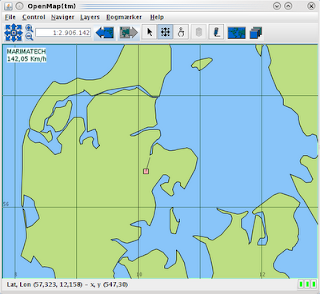
Build your own GPS/GIS system in less than 200 lines with OpenMap


Here is how to do your own (simplistic) GPS/GIS system using OpenMap in less than 200 lines of code. To get started you will need to download and install OpenMap.

The GPS Layer for OpenMap is as follows. Notice that the code is somewhat crude with regards to threading, drizzel some synchronized on to it as appropriate.


public class GPSLayer extends OMGraphicHandlerLayer {

private static String GPSDATA = "gpsData";

private static final double KT2MPS = 1852.0 / 3600.0;

private static final double speedVectorLengthInMinutes = 6;

private String gpsDataPath = "";

private float latitude, longitude, speed, course;

private OMGraphicList graphics = new OMGraphicList();;

private OMRect gpsPosition = new OMRect(0, 0, 0, 0, 10, 10);

private OMLine speedVector;

private OMText gpsText = new OMText(10, 20, "GPS Data",
OMText.JUSTIFY_LEFT);

private Timer timer;

public GPSLayer() {
gpsText.setFillPaint(Color.WHITE);
gpsText.setTextMatteColor(new Color(182, 235, 219));
gpsPosition.setFillPaint(Color.pink);
}

@Override
public void setProperties(String prefix, Properties props) {
super.setProperties(prefix, props);
gpsDataPath = props.getProperty(prefix + "." + GPSDATA);
// redraw every 5 secs
timer = new Timer(5000, this);
timer.start();

// emulate reading GPS data (threading issue here access to members not
// protected!)
new Thread(new Runnable() {
public void run() {
try {
BufferedReader in = new BufferedReader(new FileReader(
gpsDataPath));
String str;
while ((str = in.readLine()) != null) {
Thread.sleep(100);
if (str.startsWith("$GPRMC")) {
String[] fields = str.split(",");
// utc_date = fields[1];
double lat = Double.parseDouble(fields[3]);
double degrees = Math.floor((lat / 100.0));
double minute = (lat / 100.0) - degrees;
lat = (degrees) + ((minute * 100.0) / 60);
if (fields[4].equals("S"))
lat = -lat;
latitude = (float) lat;

double lon = Double.parseDouble(fields[5]);
degrees = Math.floor((lon / 100.0));
minute = (lon / 100.0) - degrees;
lon = (degrees) + ((minute * 100.0) / 60);
if (fields[6].equals("W"))
lon = -lon;
longitude = (float) lon;

speed = (float) (Double.parseDouble(fields[7]) * KT2MPS);

if (!fields[8].equals("")) {
course = (float) Double.parseDouble(fields[8]);
}
// could parse date but to lazy
// date = fields[9];
}
}
in.close();
} catch (Exception e) {
e.printStackTrace();
}
}
}).start();
}

@Override
public synchronized OMGraphicList prepare() {
gpsPosition.setLocation(latitude, longitude, -5, -5, 5, 5);

// calc. speed vector length using OM GIS functions
LatLonPoint startPos = new LatLonPoint(latitude, longitude);
float length = (float) Length.KM.toRadians(speedVectorLengthInMinutes
* ((speed * 3.6) / 60.0));
LatLonPoint endPos = startPos.getPoint(length, (float) ProjMath
.degToRad(course));
speedVector = new OMLine(startPos.getLatitude(), startPos
.getLongitude(), endPos.getLatitude(), endPos.getLongitude(),
OMLine.LINETYPE_STRAIGHT);
// vec.addArrowHead(OMArrowHead.ARROWHEAD_DIRECTION_FORWARD, 100, 3, 1);
speedVector.setLinePaint(Color.DARK_GRAY);

graphics.clear();
// order of add determines what is rendered on top
graphics.add(speedVector);
graphics.add(gpsPosition);
gpsText.setData(String.format("GPS Data\n%4.2f Km/h",
(speed * 3.60)));
graphics.add(gpsText);

graphics.project(getProjection());
return graphics;
}

@Override
public void actionPerformed(ActionEvent ae) {
doPrepare();
}
}

If you have a GPS antenna you can use one of the free GPS servers (gpsd on linux) to make its data available on a socket and then modify the in variable in reader thread to the following:

uc = new URL(gpsDataPath).openConnection(); // gps.gpsData=http://localhost:2244
InputStreamReader icr = new InputStreamReader(uc.getInputStream());
in = new BufferedReader(icr);


To run this put the above class into a jar file and copy it to the lib dir of the OpenMap installation. Then in the share dir create a openmap.properties file with the following content:

openmap.layers=gps graticule shapePolitical
openmap.startUpLayers=gps graticule shapePolitical

gps.class=GPSLayer
gps.prettyName=GPS Position
gps.gpsData=/tmp/gpslog.txt


Then go to the bin dir of the OpenMap installation and do ./openmap(.bat) and your GPS/GIS system will be running.

Then following can be used as test data

$GPRMC,143346,A,5616.9232,N,01008.2504,E,074.6,011.3,110105,000.9,E,A*13
$GPRMC,143347,A,5616.9435,N,01008.2571,E,074.5,010.4,110105,000.9,E,A*14
$GPRMC,143348,A,5616.9638,N,01008.2632,E,074.4,009.5,110105,000.9,E,A*18
$GPRMC,143349,A,5616.9842,N,01008.2686,E,074.3,008.4,110105,000.9,E,A*12

Friday, August 21, 2009

Persisting JXTable's Column Control Settings

Here is how to persist (save/restore) the users settings (ordering of columns, visbility etc) of a JXTable using the Swing Application Framework aka SAF (JSR-296). You will need to download the jar for SAF to get the stuff below working.

(Notice that all of this is inspirede by NetBeans Platform meets Swing Application Framework: SessionStorage but without all the NetBeans clutter.)

/**
*
* @See http://puces-blog.blogspot.com/2009/04/netbeans-platform-meets-swing.html
*/

public class ModuleApplicationContext extends ApplicationContext {

private String storageDirectoryPath = "";

static {

// download from https://jdnc-incubator.dev.java.net/source/browse/jdnc-incubator/trunk/src/kleopatra/java/org/jdesktop/appframework/swingx/XProperties.java?rev=3198&view=markup
new XProperties().registerPersistenceDelegates();
}

public ModuleApplicationContext(String path) {
// Needed due to issue
// https://appframework.dev.java.net/issues/show_bug.cgi?id=112
setLocalStorage(new ModuleLocalStorage(this));
// getLocalStorage().setDirectory(getModuleSessionStorageDir(moduleInfo));
storageDirectoryPath = path;
getLocalStorage().setDirectory(new File(storageDirectoryPath));
getSessionStorage().putProperty(JXTable.class,
new XProperties.XTableProperty());
}

}


/**
* A LocalStorage for modules. It respects the direcory property in JNLP mode.

*

* Needed due to issue * HREF="https://appframework.dev.java.net/issues/show_bug.cgi?id=112">
* https://appframework.dev.java.net/issues/show_bug.cgi?id=112
*
* @author puce
*/

public class ModuleLocalStorage extends LocalStorage {

public ModuleLocalStorage(ApplicationContext context) {
super(context);
}

@Override
public boolean deleteFile(String fileName) throws IOException {
File path = new File(getDirectory(), fileName);
return path.delete();
}

@Override
public InputStream openInputFile(String fileName) throws IOException {
File path = new File(getDirectory(), fileName);
return new BufferedInputStream(new FileInputStream(path));
}

@Override
public OutputStream openOutputFile(String fileName) throws IOException {
File path = new File(getDirectory(), fileName);
return new BufferedOutputStream(new FileOutputStream(path));
}
}


Then you can use the ModuleApplicationContext to save the column control settings of a JXTable doing something like below:


public class TestJXTable extends JFrame {

String data[][] = { { "John", "Sutherland", "Student" },
{ "George", "Davies", "Student" },
{ "Melissa", "Anderson", "Associate" },
{ "Stergios", "Maglaras", "Developer" }, };

String fields[] = { "Name", "Surname", "Status" };

ModuleApplicationContext mac;

JXTable jt;

JScrollPane pane;

public static void main(String[] argv) {
SwingUtilities.invokeLater(new Runnable() {
@Override
public void run() {
TestJXTable myExample = new TestJXTable(
"JXTable Example");
}
});
}

public TestJXTable(String title) {
super(title);
// save settings in users home dir
mac = new ModuleApplicationContext(System.getProperty("user.home"));
setSize(150, 150);
addWindowListener(new WindowAdapter() {
public void windowClosing(WindowEvent we) {
dispose();
try {
jt.getParent().remove(jt);
mac.getSessionStorage().save(jt, "testTable.xml");
} catch (IOException e) {
e.printStackTrace();
}
System.exit(0);
}
});
init();
pack();
setVisible(true);
}

private void init() {
jt = new JXTable(data, fields);
jt.setColumnControlVisible(true);
jt.setName("testTable");
pane = new JScrollPane(jt);
pane.setName("testPane");
try {
mac.getSessionStorage().restore(jt, "testTable.xml");
} catch (IOException e) {
e.printStackTrace();
}
getContentPane().add(pane);
}
}

Tuesday, August 18, 2009

Font sizer in OpenMap statusbar

If you run OpenMap (beta5) under the Substance 5.2 LAF you can add a font size slider to the OpenMap statusbar doing this:


public class FontPanel extends OMComponentPanel {

public FontPanel() {
}

@Override
public void findAndInit(Object obj) {
if (obj instanceof InformationDelegator) {
InformationDelegator delgator = (InformationDelegator) obj;
GridBagConstraints c = new GridBagConstraints();
c.weightx = 1;
c.weighty = 1;
c.anchor = GridBagConstraints.EAST;
c.fill = GridBagConstraints.HORIZONTAL;
c.insets = new Insets(0, 0, 0, 4);
Component statusPanel = DialogUtils.getChildNamed(delgator,
StatusLightPanel.class);
delgator.remove(statusPanel);
delgator.add(FontSizePanel.getPanel(), c);
delgator.add(statusPanel);
}
}
}


Add the above class to your openmap.components in openmap.properties and then run OM with
-Dswing.defaultlaf=org.jvnet.substance.skin.SubstanceCremeLookAndFeel
Click here to see how this looks.

FontSizePanel.java can be found here or downloaded from the Substance homepage.

Substance with VLDocking Framework


Here is a simple UI integration of the VLDocking Framework with Substance 5.2.

In main do:

DockingUISettings.getInstance().installUI();
//and start customizing... MyDockViewTitleBarUI
UIManager.put("DockViewTitleBarUI", "MyDockViewTitleBarUI");


public class MyDockViewTitleBarUI extends DockViewTitleBarUI {

public MyDockViewTitleBarUI(DockViewTitleBar tb) {
super(tb);
SubstanceLookAndFeel.setDecorationType(tb,
DecorationAreaType.PRIMARY_TITLE_PANE);
tb.setForeground(SubstanceColorUtilities
.getForegroundColor(SubstanceColorSchemeUtilities
.getColorScheme(tb, ComponentState.ACTIVE)));
}


static public MyDockViewTitleBarUI createUI(JComponent tb) {
return new MyDockViewTitleBarUI((DockViewTitleBar) tb);
}

@Override
public void paint(Graphics g, JComponent c) {
DockViewTitleBar tb = (DockViewTitleBar) c;

SubstanceSkin skin = SubstanceCoreUtilities.getSkin(tb);
if (skin != null) {
SubstanceDecorationUtilities
.paintDecorationBackground(g, tb, false);
} else {
super.paint(g, tb);
}
}
}

JXTable Striping with Substance 5.2

Here is how I got table striping to work on JXTable with Substance 5.2.


public class DefaultTableFactory implements TableFactory {

public JTable createTable() {
JXTable result = new JXTable();
return configureTable(result);
}

public JTable createTable(TableModel model) {
JXTable result = new JXTable(model);
return configureTable(result);
}

private JXTable configureTable(JXTable result) {
result.getSelectionMapper().setEnabled(false);
result.setColumnControlVisible(true);
result.setHighlighters(createHighlighter(result), new ColorHighlighter(
HighlightPredicate.ROLLOVER_ROW, null, Color.BLUE));
result.setRolloverEnabled(true);
result.setHorizontalScrollEnabled(true);
return result;
}

public CompoundHighlighter createHighlighter(JXTable t) {
ColorHighlighter first = new SubstanceHighLighter(HighlightPredicate.EVEN, t);
ColorHighlighter hl = new SubstanceHighLighter(HighlightPredicate.ODD,t);
return new CompoundHighlighter(first, hl);
}

// get striping on jxtable to work with substance
public class SubstanceHighLighter extends ColorHighlighter {

private JXTable comp;

SubstanceHighLighter(HighlightPredicate pred, JXTable t) {
setHighlightPredicate(pred);
comp = t;
}

@Override
public Color getBackground() {
return SubstanceColorUtilities.getStripedBackground(comp,
getHighlightPredicate() == HighlightPredicate.EVEN ? 1 : 0);
}

}

There is still a problem with some of the cell renders installed by JXTable...

Live Traffic Map